
Chapter 1 - A Tour of Computer Systems
0 写在前面
2026/07/17
希望自己能坚持下去
2026/07/29 12:09
终于啃完了第一章,继续加油
1 Information Is Bits + Context
A computer system consists of hardware and systems software that work together to run application programs. Specific implementations of systems change over time, but the underlying concepts do not. All computer systems have similar hardware and software components that perform similar functions.
1 |
|
Our hello program begins life as a source program (or source file) that the programmer creates with an editor and saves in a text file called hello.c.
The source program is a sequence of bits, each with a value of 0 or 1, organized in 8-bit chunks(块) called bytes. Each byte represents some text character in the program.
Most computer systems represent text characters using the ASCII standard that represents each character with a unique byte-size integer value.
例如,在hello.c中,‘#’对应35,‘i’对应105等
The hello.c program is stored in a file as a sequence of bytes. Each byte has an integer value that corresponds to some character. For example, the first byte has the integer value 35, which corresponds to the character ‘#’. The second byte has the integer value 105, which corresponds to the character ‘i’.
注意每一行都以’\n’结尾
Files such as hello.c that consists exclusively(独有地,专门地) of ASCII characters are known as text files. All other files are known as binary files.
The representation of hello.c illustrates a fundamental idea: All information in a system—including disk files, programs stored in memory, user data stored in memory,and data transferred across a network—is represented as a bunch of bits.
The only thing that distinguishes different data objects is the context in which we view them. For example, in different contexts, the same sequence of bytes might represent an integer, floating-point number, character string, or machine instruction.
2 Programs Are Translated by Other Programs into Different Forms
The hello program begins life as a high-level C program because it can be read and understood by human beings in that form.
However, in order to run hello.c on the system, the individual C statements must be translated by other programs into a sequence of low-level machine-language instructions. These instructions are then packaged in a form called an executable object program and stored as a binary disk file. Object programs are also referred to as executable object files.
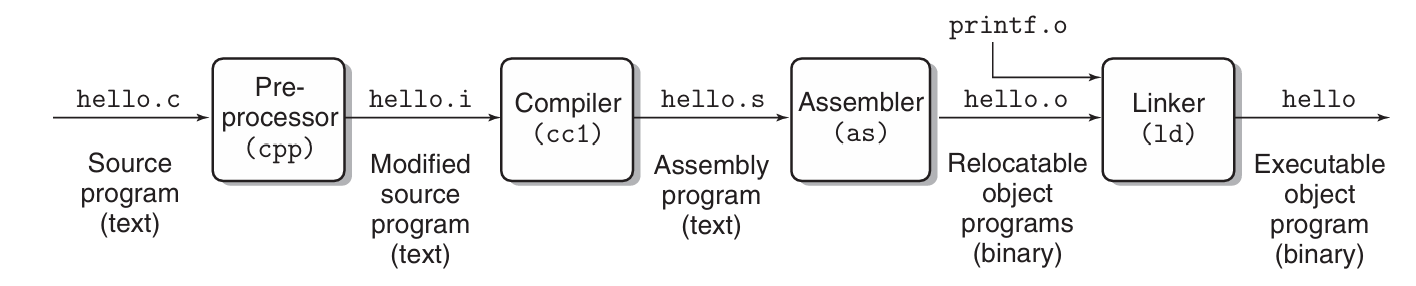
1 | gcc -o hello hello.c |
Here, the GCC compiler driver reads the source file hello.c and translates it into an executable object file hello. The translation is performed in the sequence of four phases shown in the figure above.
The programs that perform the four phases
- preprocessor
- compiler
- assembler
- linker
are known collectively as the compilation system
3 It Pays to Understand How Compilation Systems Work
这时我开始对照着中文版啃书,所以这部分就偷懒不啃原版了
对于hello.c这样简单的程序,我们可以依靠编译系统生成正确有效的机器码,但是我们也需要知道编译系统是如何工作的
- 优化程序性能。 为了在C程序中做出好的写代码选择,我们需要了解一些机器代码以及编译器将不同的C语句转化为机器代码的方式
- 理解链接时出现的错误。
- 避免安全漏洞
感觉后面都会细说,就不详细写了
4 Processors Read and Interpret Instructions Stored in Memory
Now our hello.c source program has been translated by the compilation system into an executable object file called hello that is stored on disk(磁盘).
To run the executable file on a Unix system, we type its name to an application program known as a shell:
1 | gcc -o hello hello.c |
The shell is a command-line interpreter(命令解释器) that prints a prompt(提示符), waits for you to type a command line, and then performs the command, If the first word of the command line does not correspond to a built-in shell command, then the shell assumes that it’s the name of an executable file that it should load and run. So in this case, the shell loads and runs the hello program and then waits it to terminate.
hello程序在屏幕上打印出hello, world并终止,shell打印出提示符并等待下一条命令
4.1 Hardware Organization of a System
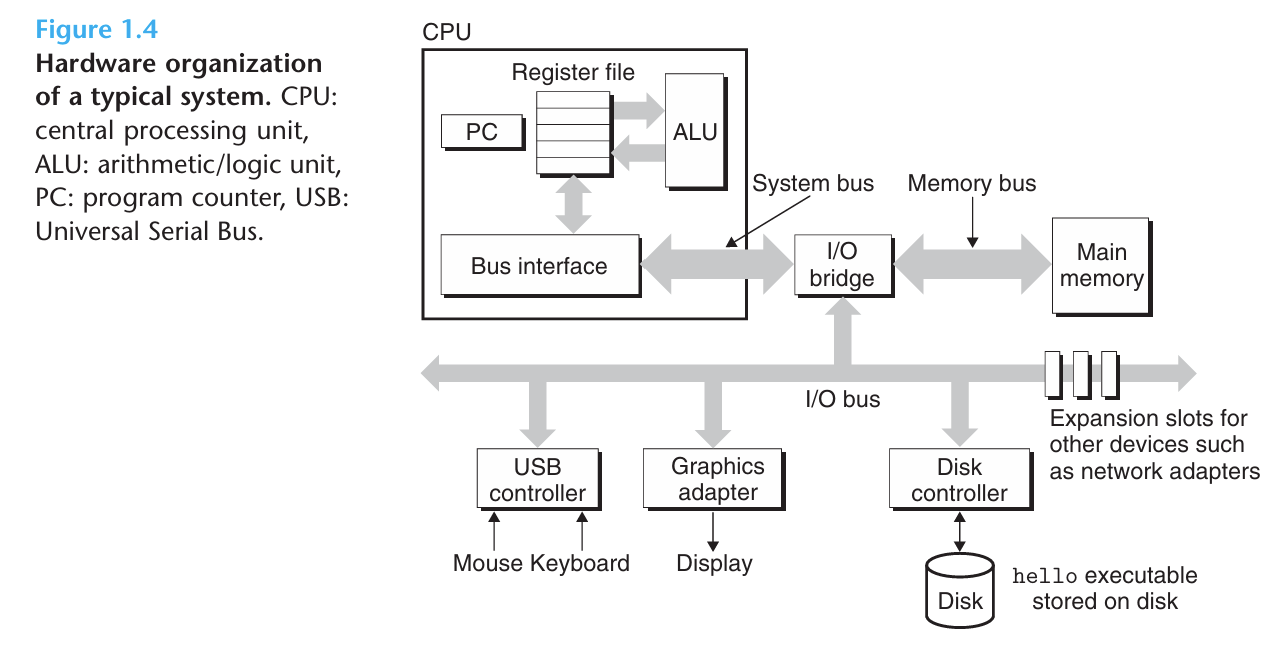
为了理解我们运行hello程序时发生了什么,我们需要了解一个典型的系统的硬件组织
4.1.1 Buses
Running throughout the system is a collection of electrical conduits(导管,管道) called buses(总线) that carry bytes of information back and forth between the components.
Buses are typically designed to transfer fixed-size chunks of bytes known as words(字). The number of bytes in a word(即字长word size) is a fundamental system parameter that varies across systems.
Most machines today have word sizes of either 4 bytes or 8 bytes.
4.1.2 I/O Devices
Input/output devices are the system’s connection to the external world. Our example systems has four I/O devices: a keyboard and mouse for user input, a display(显示器) for user output, and a disk drive (or disk) for long-term storage of data and programs(这里的磁盘可以理解为电脑上的C盘什么的,它和硬盘可以大概认为是一个东西,但现在电脑的C盘的实体大概不是“盘”了,尽管如此,我们只需要抽象的视角,把磁盘看作一个掉电后数据不丢、容量很大但速度慢的存储设备即可). Initially, the execitable hello program resides on the disk.
Each I/O device is connected to the I/O bus by either a controller(控制器) or an adapter(适配器). The distinction between the two is maily one of packaging(中文版翻译为区别主要体现在封装方式上).
Controllers are chip sets in the device itself or on the systems’s main printed circuit board (often called the motherboard). An adapter is a card that plugs into a slot on the motherboard.
Regardless, the purpose of each is to transfer information back and forth between the I/O bus and an I/O device.
4.1.3 Main Memory
The main memory(主存) is a temporary storage device that holds both a program and the data it manipulates while the processor is executing the program. Physically, main memory consists of a collection of dynamic random access memory (DRAM,动态随机存取存储器) chips. Logically, memory is organized as a linear array of bytes, each with its own unique address (array index) starting at 0. Generally, each of the machine instructions that constitute(组成) a program can consist of a variable number of bytes.
C程序中的变量对应的数据项的大小是根据类型变化的,例如在运行Linux的x86-64机器上,int类型需要4个字节,double需要8个字节
4.1.4 Processor
The central processing unit (CPU,中央处理单元), or simply processor, is the engine that interprets (or executes) instructions stored in main memory. At its core is a word-size(大小为一个字的) storage device (or register) called the program counter (PC,程序计数器). At any point in time, the PC points at (contains the address of) some machine-language instruction in main memory.(PC在任何时刻都指向主存中的某条机器语言指令,换句话说,PC存放着这条指令的地址)
From the time that power is applied to the system until the time that the power is shut off, a processor repeatedly executes the instruction pointed at by the program counter and updates the program counter to point to the next instruction.
处理器看上去是按照一个非常简单的指令执行模型来操作的,这个模型由**instruction set architecture(指令集架构)**决定。在这个模型中,指令按照严格的顺序执行,执行单条指令又包含执行一系列步骤。处理器从PC指向的内存处读取指令,理解指令中的bits,执行该指令指示的简单操作,然后更新PC使其指向下一条指令,注意这条指令未必和刚刚执行的指令在内存中相邻。
这样的简单操作并不多,它们围绕着主存、register file(寄存器文件) 和 arithmetic/logic unit(ALU,算术/逻辑单元) 进行。寄存器文件是一个小的存储设备,它由一些单个字长的寄存器组成,每个寄存器有独特的名字。ALU计算新的数据和地址值,下面是一些CPU在指令要求下可能会执行的简单操作的例子
- Load: Copy a byte or a word from main memory into a register, overwriting the previous contents of the register.
- Store: Copy a byte or a word from a register to a location in main memory, overwriting the previous contents of that location.
- Operate: Copy the contents of two registers to the ALU, perform an arithmetic operation on the two words, and store the result in a register, overwriting the previous contents of that register.
- Jump: Extract(提取) a word from the instruction itself and copy that word into the PC, overwriting the previous value of the PC.
处理器看上去是它的指令集架构的简单实现,但现代处理器使用了非常 复杂的机制来加速程序的执行,所以我们将处理器的指令集架构和处理器的**microarchitecture(微体系结构)**区分开来。
指令集架构描述的是每条机器代码指令的效果,而微体系结构描述的是处理器实际上是如何实现的
4.2 Running the hello Program
下面我们介绍运行hello程序时发生了什么,不过省略了很多细节。
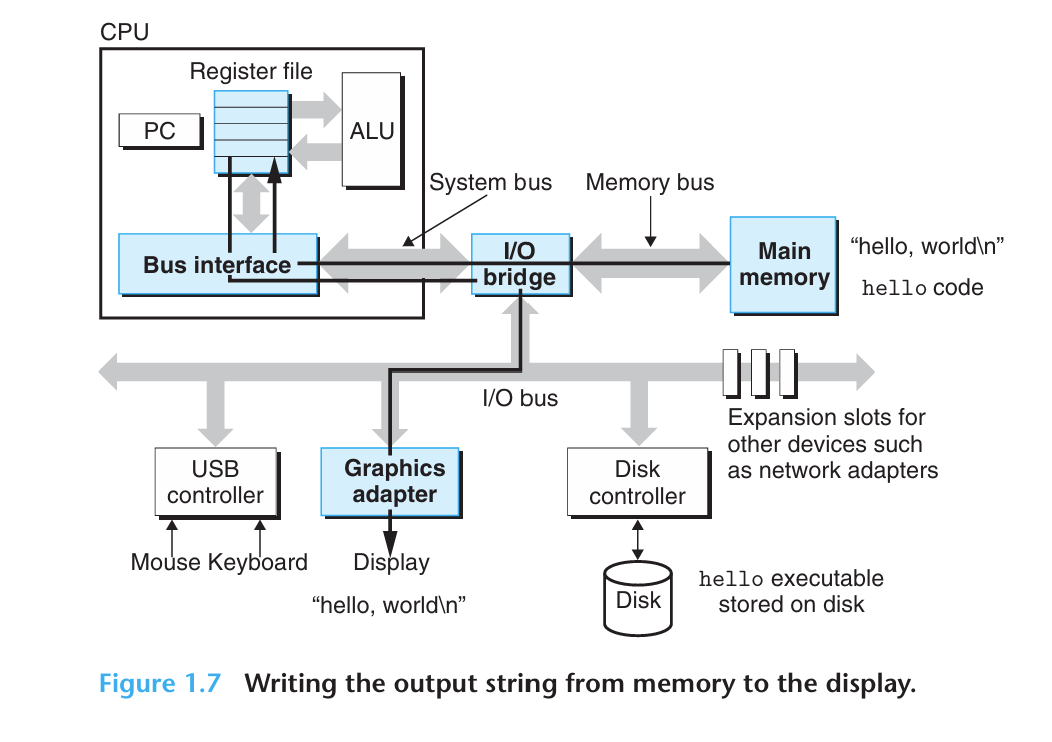
起初,shell程序执行它的指令(由CPU执行),等待我们输入一个命令,当我们在键盘上输入./hello时,shell程序将字符逐一读入寄存器再把它存放到内存中。
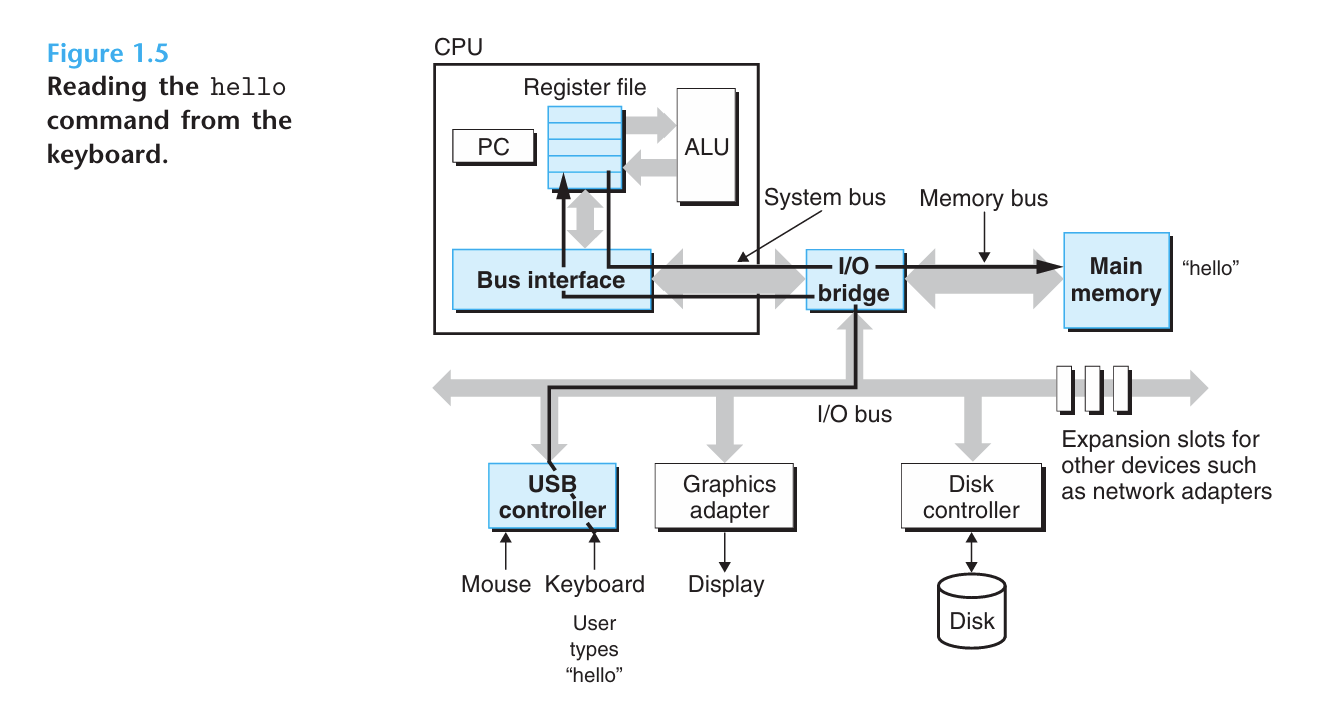
通过问ai,这里似乎描述的是一种逻辑上的流程,实际物理层可能是键盘输入字符,字符进入内存中的输入缓冲区,并不是先到CPU再到内存,CPU正在运行shell,shell程序需要知道用户输入了什么,CPU执行一些指令,比如从输入缓冲区读取字符到寄存器并处理,比如输入缓冲区中是./hello,CPU读取'.', '/'等并判断是不是命令、要不要执行等
当我们按下enter键时,shell程序知道我们结束了命令的输入,shell程序通过执行一系列指令(其实都是CPU执行的,这是一种站在软件抽象层的简写)加载可执行文件hello,这些指令把hello目标文件里的代码和数据从磁盘复制到主存,数据包括最终输出的字符串"hello, world\n"
磁盘控制器收到指令后,利用一种叫 direct memory access(DMA,直接存储器存取) 的技术,使数据可以不通过处理器而直接从磁盘到达主存。这是一个统一的加载过程。CPU执行的是控制加载的指令,而数据复制这一具体动作在现代计算机中通常由DMA完成。
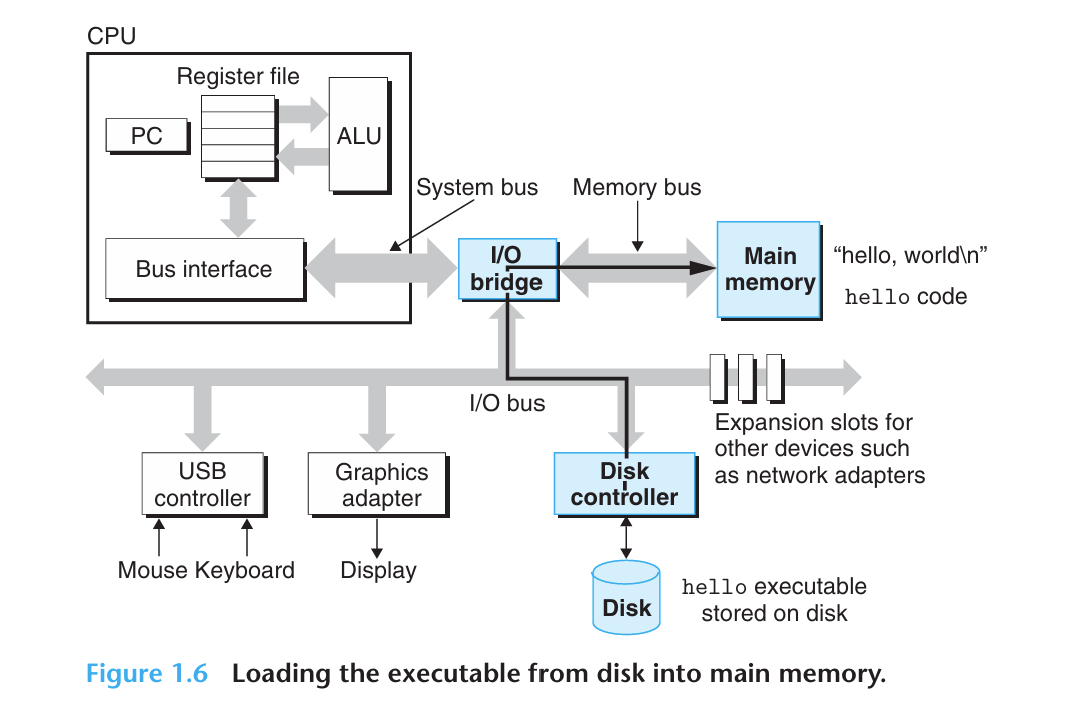
一旦hello目标文件中的代码和数据被加载到主存,处理器开始执行hello程序中的main程序中的机器语言指令(原文main routine是指从main函数入口开始的那一整块机器指令),这些指令将"hello, world\n"字符串中的字节从主存复制到寄存器文件,再从寄存器文件复制到显示设备,最终显示在屏幕上。
5 Caches Matter
An important lesson from this simple example is that a system spends a lot of time moving information from one place to another. The machine instructions in the hello program are originally stored on disk. When the program is loaded, they are copied to main memory. As the processor runs the program, instructions are copied from main memory into the processor. Similarly, the data string hello,world\n, originally on disk, is copied to main memory and then copied from main memory to the display device.
From a programmer’s perspective, much of this copying is overhead(开销) that slows down the “real work” of the program. System designers want to make these copy operations run as fast as possible.
Because of physical laws, larger storage devices are slower than smaller storage devices. And faster devices are more expensive to build than their slower counterparts(与另一方作用相当的物).
For example, the disk drive on a typical system might be 1,000 times larger than the main memory, but it might take the processor 10,000,000 times longer to read a word from disk than from memory.
Similarly, a typical register file stores only a few hundred bytes of information, as opposed to billions of bytes in the main memory. However, the processor can read data from the register file almost 100 times faster than from memory. Even more troublesome, as semiconductor technology progresses over the years, this processor–memory gap continues to increase. It is easier and cheaper to make processors run faster than it is to make main memory run faster.
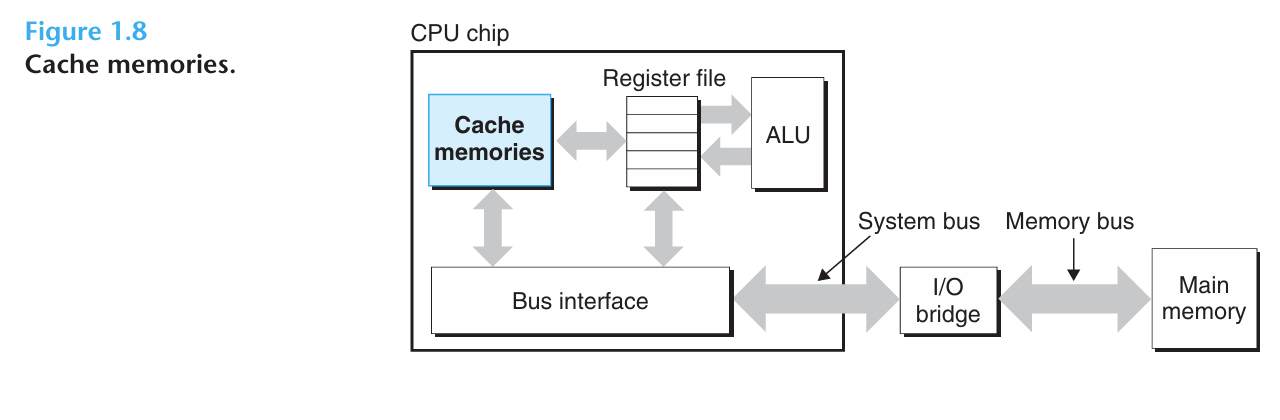
To deal with the processor-memory gap, system designers include smaller, faster storage devices called cache memories (or simply cashes,高速缓存) that serve as temporary staging areas for information that the processor is likely to need in the near future.
An L1 cache(一级缓存) on the processor chip holds tens of thousands of(数万) bytes and can be accessed nearly as fasat as the register file. A larger L2 cache with hundreds of thousands to millions of bytes is connected to the processor by a special bus. It might take 5 times longer for the processor to access the L2 cache than the L1 cache, but this is still 5 to 10 times faster than accessing the main memory.
The L1 and L2 caches are implemented with a hardware technology known as static random access memory (SRAM,静态随机访问存储器)
处理能力更强大的系统甚至有三级高速缓存。
高速缓存背后的思想是系统可以同时取得较大的内存和快速访问的效果,这是利用高速缓存的locality(局部性),即程序具有访问局部区域里的数据和代码的趋势。通过让高速缓存里存放可能经常访问的数据,大部分的内存操作能在快速的高速缓存中完成
6 Storage Devices From a Hierarchy
This notion(见解) of inserting a smaller, faster storage device (e.g., cache memory) between the processor and a larger, slower device (e.g., main memory) turns out to be a general idea.
In fact, the storage devices in every computer system are organized as a memory hierarchy similar to Figure 1.9. As we move from the top of the hierarchy to the bottom, the devices become slower, larger, and less costly per byte. The register file occupies the top level in the hierarchy, which is known as level 0 or L0. We show three levels of caching L1 to L3, occupying memory hierarchy levels 1 to 3. Main memory occupies level 4, and so on.
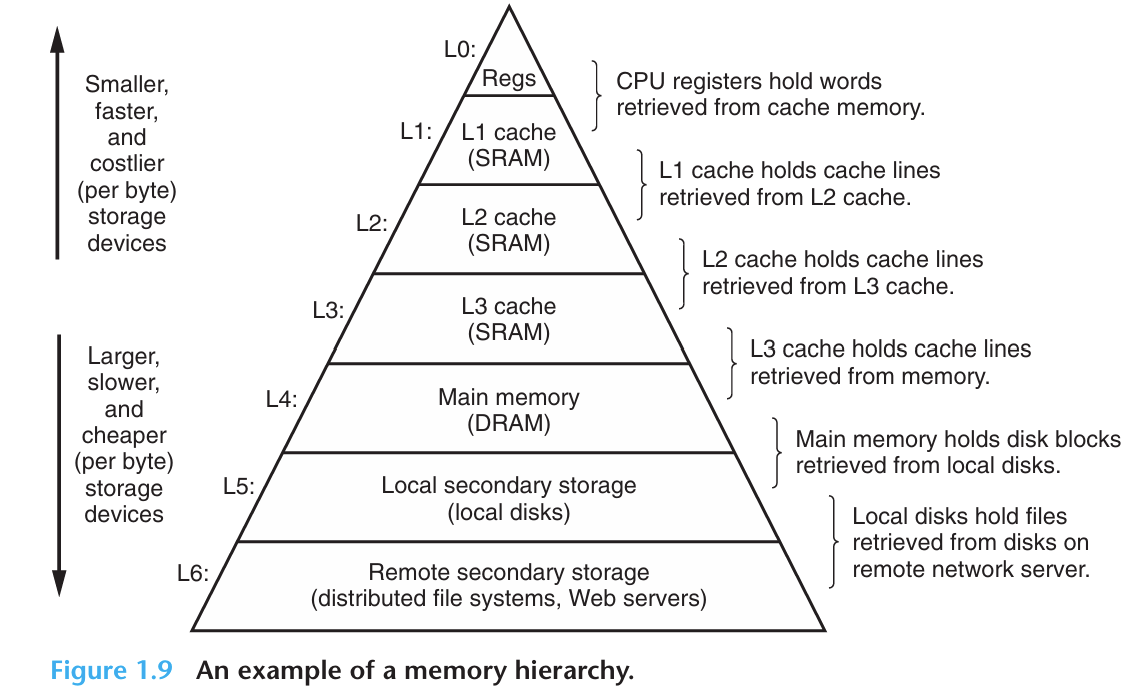
The main idea of a memory hierarchy is that storage at one level serves as a cache for storage at the next lower level. Thus, the register file is a cache for the L1 cache. Caches L1 and L2 are caches for L2 and L3, respectively. The L3 cache is a cache for the main memory, which is a cache for the disk.
7 The Operating System Manages the Hardware
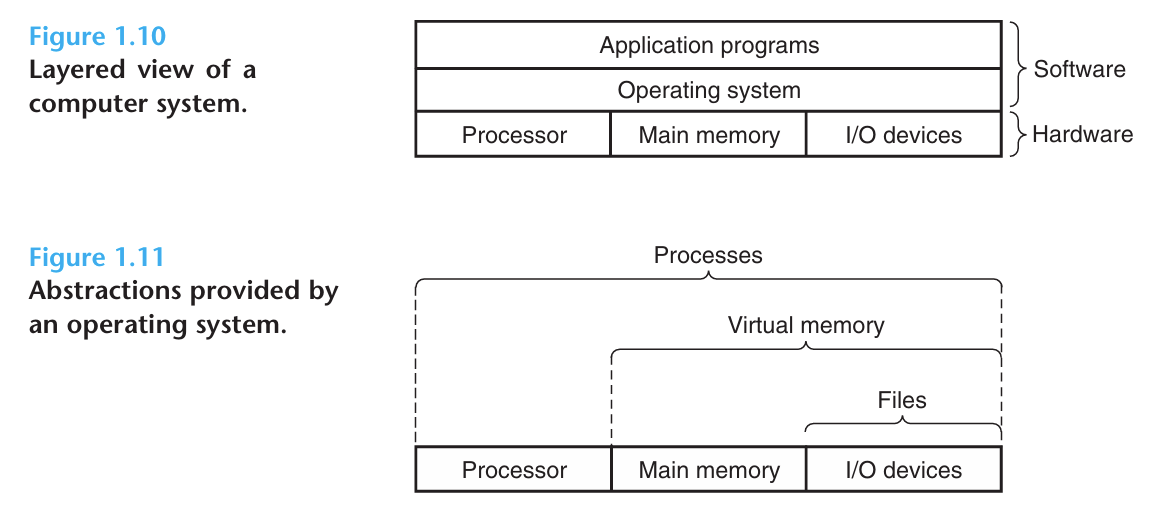
When the shell loaded and ran the hello program, and when the hello program printed its message, neither program accessed the keyboard, display, disk, or main memory directly. Rather, they relied on the services provided by the operating system(操作系统). We can think of the OS as a layer of software interposed(插入) between the application program and the hardware. All attempts by an application program to manipulate the hardware must go through the operating system.
The OS has two primary purposes:
- to protect the hardware from misuse(滥用) by runaway(失控的) applications
- to provide applications with simple and uniform mechanisms(机制) for manipulating complicated and often wildly different low-level hardware devices.
The operating system achieves both goals via the fundamental abstractions shown in Figure 1.11: processes(进程), virtual memory(虚拟内存), and files(文件).
Files are abstractions for I/O devices, virtual memory is an abstraction for both the main memory and disk I/O devices, and processes are abstractions for the processor, main memory, and I/O devices.
7.1 Processes
When a program such as hello runs on a modern system, the operating system provides the illusion(假象) that the program is the only one running on the system. The program appears to have exclusive(专用的) use of both the processor, main memory, and
I/O devices. The processor appears to execute the instructions in the program, one after the other, without interruption. And the code and data of the program appear to be the only objects in the system’s memory. These illusions are provided by the notion of a process.
A process(进程) is the operating system’s abstraction for a running program. Multiple processes can run concurrently(同时发生地) on the same system, and each process appears to have exclusive use of the hardware. By concurrently(并发运行), we mean that the instructions of one process are interleaved(交错执行) with the instructions of another process.
在大多数系统中,需要运行的进程数多于可以运行它们的CPU个数。传统的系统在一个时刻只能执行一个程序,而先进的多核处理器(multicore processors)能同时执行多个程序。
无论是在单核还是多核系统,一个CPU看上去都像是在并发地执行多个进程,这是通过处理器在进程间切换来实现的。操作系统实现这种交错执行的机制称为context switching(上下文切换)。
下面我们讨论只包含一个CPU的单处理器系统(uniprocessor system)
The operating system keeps track of all the state information that the process needs in order to run. This state, which is known as the context, includes information such as the current values of the PC, theregisterfile, and the contents of main memory. At any point in time, a uniprocessor system can only execute the code for a single process. When the operating system decides to transfer control(控制权) from the current process to some new process, it performs a context switch by saving the context of the current process, restoring(恢复) the context of the new process, and then passing control to the new process. The new process picks up exactly where it left off.
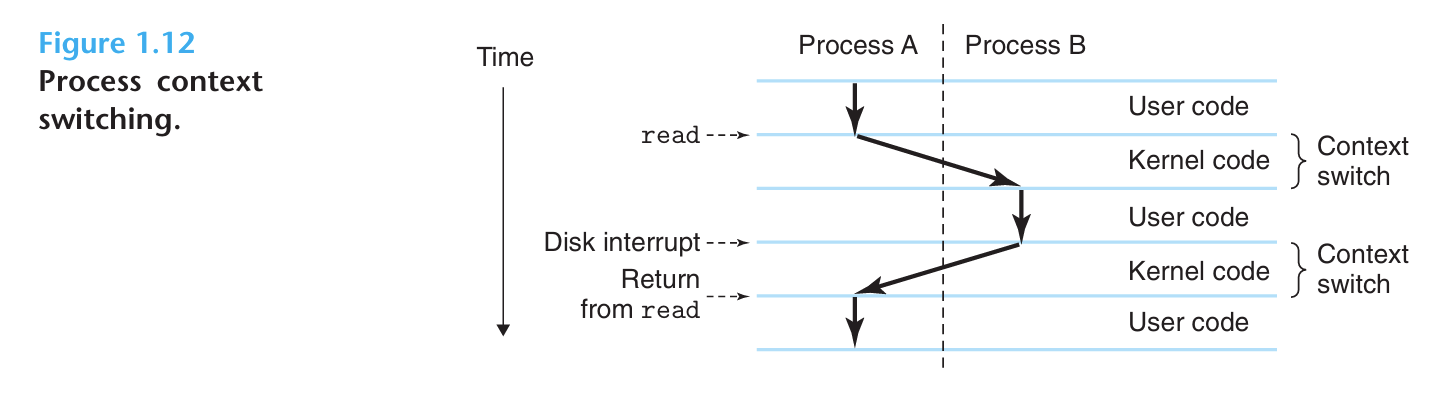
There are two concurrent processes in our example: the shell process and the hello process. Initially, the shell process is running alone, waiting for input on the command line. When we ask it to run the hello program, the shell carries out our request by invoking a special function known as a system call(系统调用) that passes control to the operating system. The operating system saves the shell’s context, creates a new hello process and its context, and then passes control to the new hello process. After hello terminates, the operating system restores the context of the shell process and passes control back to it, where it waits for the next command-line input.
The transition from one process to another is managed by the operating system kernel(内核). The kernel is the portion(部分) of the operating
system code that is always resident(居住的) in memory. When an application program
requires some action by the operating system, such as to read or write a file, it executes a special system call instruction, transferring control to the kernel. The kernel then performs the requested operation and returns back to the application program. Note that the kernel is not a separate process. Instead, it is a collection of code and data structures that the system uses to manage all the processes.
7.2 Threads
In modern systems, a process can actually consist of multiple execution units, called threads(线程), each running in the context of the process and sharing the same code and global data. Threads are an increasingly important programming model because of the requirement for concurrency(并行) in network servers, because it is easier to share data between multiple threads than between multiple processes, and because threads are typically more efficient than processes.
线程可以理解为一个程序内部的执行代码的路线,一个进程(进程是操作系统对程序的抽象)可以有多个线程,让不同线程负责不同的、独立的任务,例如一个浏览器打开网站,浏览器进程就包括响应用户输入、下载图片、渲染页面等多个线程,这些线程共享网页数据、代码、内存,可以同时进行
又比如一个聊天软件,如果只有一个线程,比如
1 | Thread 1: |
而多线程是一个程序拥有多条独立的路线,可以执行不同任务
1 | 线程1(UI): |
7.3 Virtual Memory
Virtual memory is an abstraction that provides each process with the illusion that it has exclusive use of the main memory.
Each process has the same uniform(一致的) view of memory, which is known as its virtual address space(虚拟地址空间). The virtual address space for Linux processes is shown in Figure1.13.(Other Unix systems use a similar layout.) In Linux, the topmost region of the address space is reserved for code and data in the operating system that is common to all processes. The lower region of the address space holds the code and data defined by the user’s process.
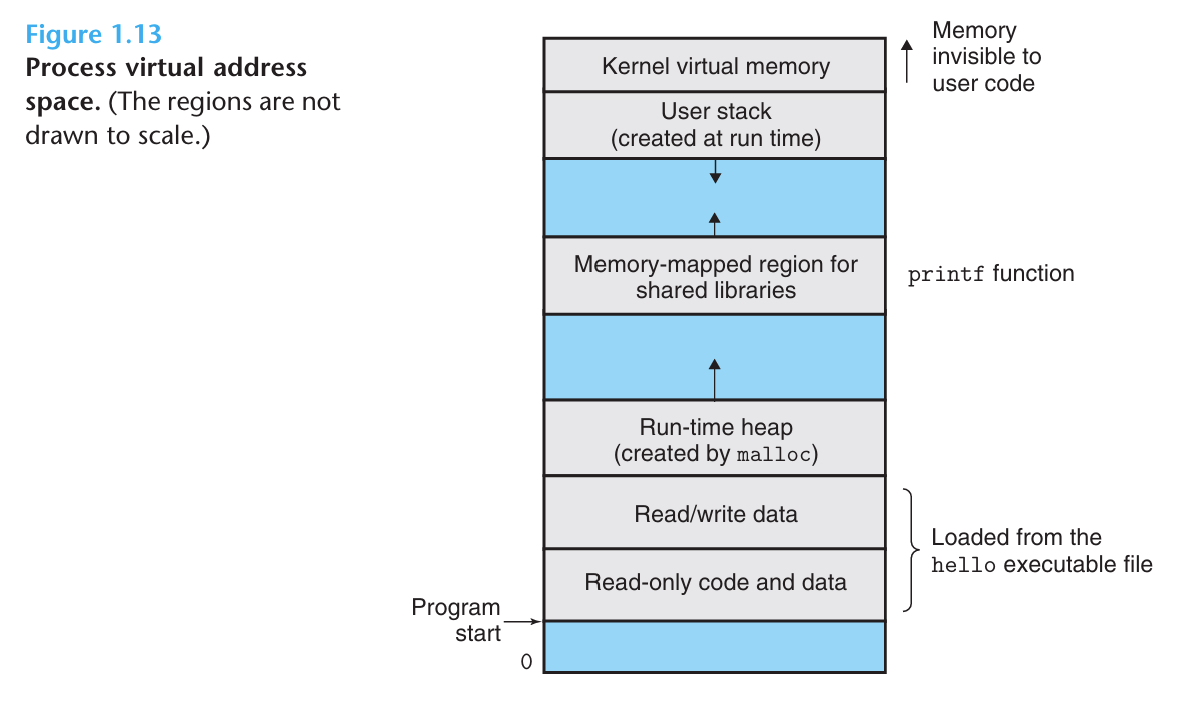
The virtual address space seen by each process consists of a number of well-defined areas, each with a specific purpose. We will look briefly at each, starting with the lowest addresses and working our way up.
- Program code and data. Code begins at the same fixed address for all processes, followed by data locations that correspond to global C variables. The code and data areas are initialized directly from the contents of an executable object file (like
helloexecutable). - Heap. The code and data areas are followed immediately by the run-time heap. Unlike the code and data areas, which are fixed in size once the process begins running, the heap expands and contracts(收缩) dynamically at run time as a result of calls to C standard library routines such as
mallocandfree. - Shared libraries. Near the middle of the address space is an area that holds the code and data for shared libraries(共享库) such as the C standard library and the math library.
- Stack. At the top of the user’s virtual address space is the user stack(用户栈) that the compiler uses to implement function calls. Like the heap, the user stack expands and contracts dynamically during the ececution of the program. In particular, each time we call a function, the stack grows. Each time we return from a function, it contracts.
- Kernal virtual memory. The top region of the address space is reserved for the kernel. Application programs are not allowed to read or write the cntents of this area or to directly call functions defined in the kernel code. Instead, they must invoke(调用) the kernel to perform these operations.
虚拟内存的运作需要硬件和操作系统软件间精密复杂的交互,包括对处理器生成的每个地址的硬件翻译,基础思想是把进程的虚拟内存的内容存储在磁盘上,然后使用主存作为磁盘的高速缓存
7.4 Files
A file is a sequence of bytes, nothing more and nothing less. Every I/O device, including disks, keyboards, displays, and even networks, is modeled as a file. All input and output in the system is performed by reading and writing files, using a small set of system calls known as Unix I/O.
This simple and elegant notion of a file is nonetheless very powerful because it provides applications with a uniform(统一的) view of all the varied I/O devices that might be contained in the system. For example, application programmers who manipulate the contents of a disk file are blissfully unaware of the specific disk technology. Further, the same program will run on different systems that use different disk technologies.
8 Systems Communicate with Other Systems Using Networks
目前为止,我们把系统视为一个孤立的硬件和软件的集合体,实际上,现代系统经常通过网络和其他系统连接到一起。对于一个单独的系统,网络可视为一个I/O设备。
当系统从主存复制一串字节到网络适配器时,数据流经过网络到达另一台机器,而不是比如到达本地的磁盘驱动器,相似地,系统可以读取从其他机器发送过来的数据,并把数据复制到主存
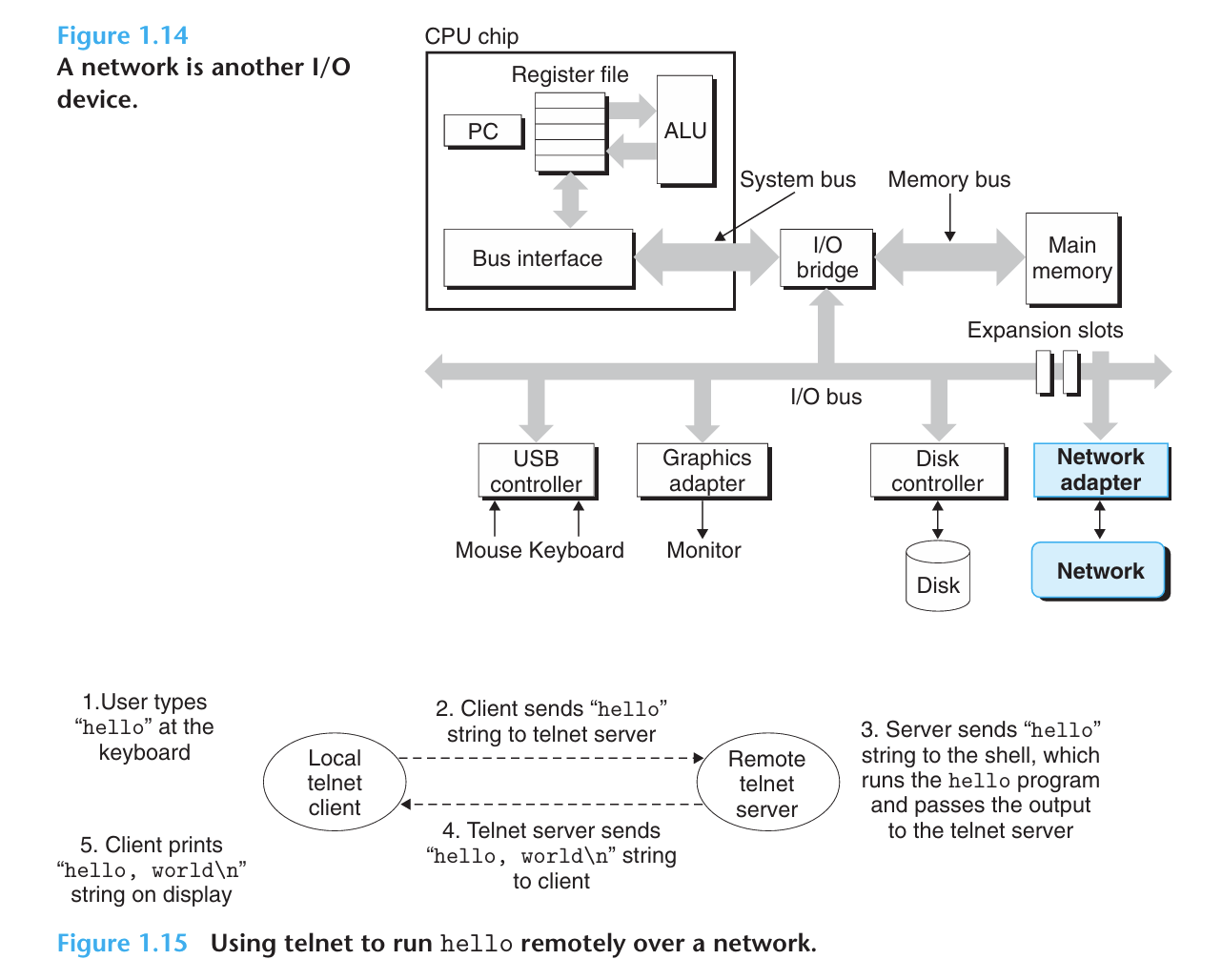
回到hello的例子,我们可以使用telnet应用在一台远程主机上运行hello程序,假设我们使用运行在本地机器的telnet client(客户端) 去连接远程主机上的telnet server(服务器),在我们登录到远程主机并运行shell后,远端的shell等待接收输入命令,之后在远端运行hello程序的步骤如图1.15所示。
9 Important Themes
呼~ 能读到现在真是不容易,让我们小结一下,以上讨论有一个重要的观点,那就是系统不仅仅只是硬件,它是硬件和系统软件相互交织的集合体,硬件和系统软件必须共同协作以达到运行应用程序的最终目的。之后的学习中我们会填补关于硬件和软件的细节,学习这些详细内容,或许我们可以写出更快速、更可靠和更安全的程序
下面介绍一些贯穿计算机系统所有方面的重要概念,作为本章的谢幕
9.1 Amdahl’s Law
Gene Amdahl对提升系统某一部分性能所带来的效果做出了简单却有见地的观察,称为Amdahl定律,主要思想是当我们对系统某个部分加速时,其对系统整体性能的影响取决于该部分的重要性和对该部分的加速程度
考虑一个系统执行某应用程序需要的时间为,假设系统某部分所需的执行时间占总时间的比例为,然后该部分性能提升比例为
那么新的执行时间为
于是加速比为
这里的时间是指必须按顺序执行的时间,例如我们要处理100个数据,先把数据从磁盘读到内存,消耗40%的时间,然后再处理这些数据,占60%的时间
假设对这60%的部分加速倍,比如原先需要40秒+60秒,现在就需要40秒+20秒,可以计算加速比为1.67
一般我们用的形式表示性能提升,用后缀×表示比例,2.2×读作2.2倍
哪怕我们将60%的部分加速到极快,即趋于无穷,加速比也只有2.5×
Amdahl定律描述了改善任何过程的一般原则。
例如,高松灯同学目前修了10个学分,她的GPA=2.75(最高5.0),其中有一门5学分的课,假设那门课她的绩点是2.5,其他课程的平均绩点是3.0
对应我们上面说的,这个5学分的课在绩点上是一个占比50%的部分,其他课加起来占比50%
假设灯回到过去,努力学习,那门课的绩点达到了5.0,那么她的GPA就变成了4!变成了原来的1.45倍,是2倍的0.725
更一般地,假设一门课的学分占总学分的,它的绩点是,其他所有课程的平均绩点是,那么
现在这门课的绩点变成倍
不过这个问题相对于上面的部分就复杂一些,因为“加速比”还要考虑, 等的影响,设,可以化简为
9.2 Concurrency and Parallelism
Throughout the history of digital computers, two demands have been constant forces in driving improvements: we want them to do more, and we want them to run faster. Both of these factors improve when the processor does more things at once.
We use the term concurrency(并发) to refer to the general concept of a system with multiple, simultaneous activities, and the term parallelism(并行) to refer to the use of concurrency to make a system run faster.
Parallelism can be exploited(利用) at multiple levels of abstraction in a computer system. We highlight three levels here, working from the highest to the lowest level in the system hierarchy.
9.2.1 Thread-Level Concurrency
Building on the process abstraction, we are able to devise(设计) systems where multiple programs execute at the same time, leading to concurrency(并发).
With threads, we can even have multiple control flows executing within a single process. Support for concurrent execution has been found in computer systems since the advent(出现) of time-sharing in the early 1960s.
Traditionally, this concurrent execution was only simulated, by having a single computer rapidly switch among its executing processes(就好像杂耍艺人保持多个球在空中飞,手上的球一直在变一样)
This form of concurrency allows multiple users to interact with a system at the same time, such as when many people want to get pages from a single Web server. It also allows a single user to engage in multiple tasks concurrently, such as having a Web browser in one window, a word processor in another, and streaming music playing at the same time.
Most actual computing was done by a
single processor, even if that processor had to switch among multiple tasks. This
configuration is known as a uniprocessor system(单处理器系统).
When we construct a system consisting of multiple processors all under the
control of a single operating system kernel, we have a multiprocessor system(多处理器系统).
Such systems have been available for large-scale computing since the 1980s, but
they have more recently become commonplace with the advent of multi-core processors(多核处理器) and hyperthreading(超线程).
处理器分为单处理器和多处理器,多处理器中又分为多核的处理器和超线程的处理器
Multi-core processors have several CPUs (referred to as “cores”) integrated onto a single integrated-circuit chip.
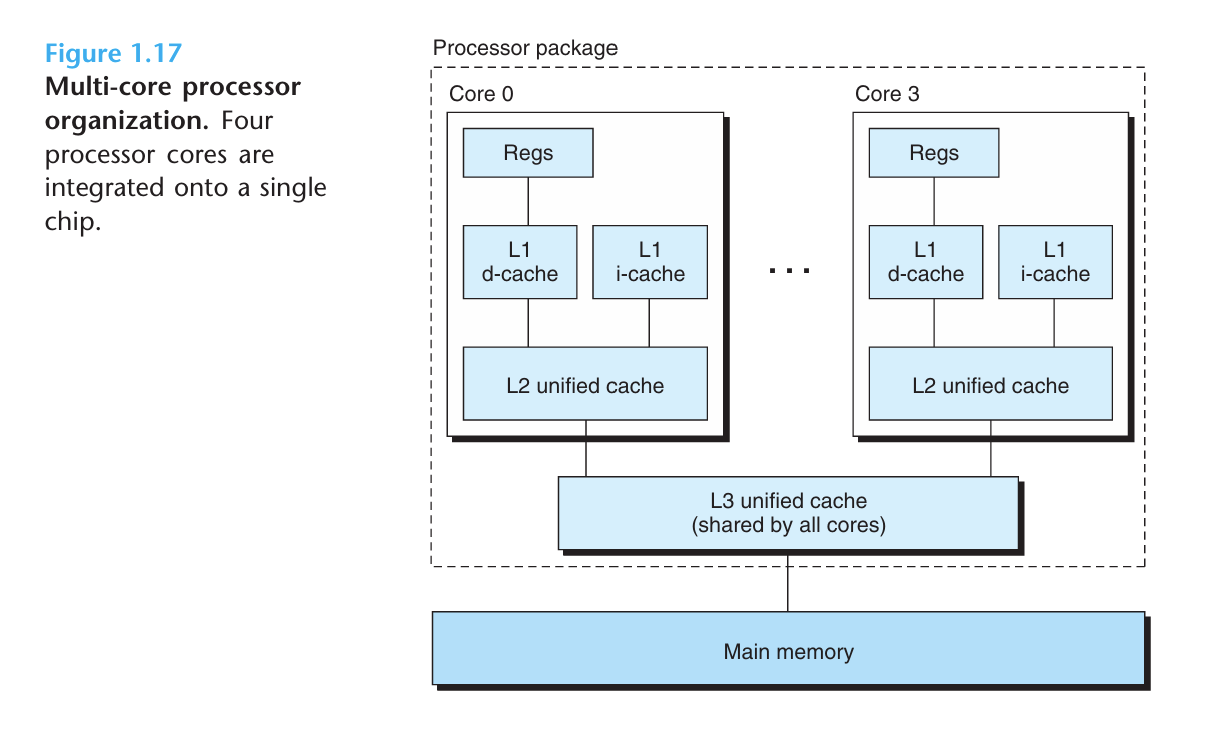
The chip has four CPU cores, each with its
own L1 and L2 caches, and with each L1 cache split into two parts—one to hold recently fetched instructions and one to hold data.The cores share higher levels of cache as well as the interface to main memory.
Hyperthreading, sometimes called simultaneous multi-threading(同时多线程), is a technique that allows a single CPU to execute multiple flows of control(控制流,指处理器执行指令的顺序,一个线程是一条控制流的载体,一个线程对应一个控制流。例如下面的例子中,线程A和线程B的flow同时存在,超线程可以做到线程间快速切换,使一个物理CPU能同时支持多个控制流的执行。举个例子,打开一个网页时,浏览器这个进程就会拆成处理用户输入、下载图片、渲染页面等多个线程). It involves having multiple copies of some of the CPU hardware, such as program counters and register files, while having only single copies of other parts of the hardware, such as the units that perform floating-point arithmetic.
While a conventional processor requires around 20,000 clock cycles to shift between different threads, a hyperthreaded processor decides which of its threads to execute on a cycle-by cycle(单个周期) basis. It enables the CPU to take better advantage of its processing resources.
For example, if one thread must wait for some data to be loaded into a cache, the
CPU can proceed with the execution of a different thread. As an example, the In
tel Core i7 processor can have each core executing two threads, and so a four-core
system can actually execute eight threads in parallel.(超线程是使一个核能提供逻辑上的多个处理器)
让我们举一个例子,例如线程A正在计算,结果遇到了缓存未命中,即数据还在内存里没取过来,需要等几百个时钟周期,普通单核处理器就只能干等,而超线程处理器由于有多份线程的“工作档案”(即PC、寄存器文件等),在下一个周期就可以立刻拿起线程B的“工作档案”开始计算线程B,因为PC和寄存器文件是两套独立的,可以做到逐周期切换。
多处理器的使用可以提高系统性能
- 它减少了执行多个任务时模拟并发的需要,可以在物理上真正做到同时进行
- 它可以使应用程序运行得更快,当然这要求程序是以多线程方式来书写的,这些线程可以并行地高效执行,因为一个单线程程序只有一个执行流,只会占用一个处理器
9.2.2 Instruction-Level Parallelism
At a much lower level of abstraction, modern processors can execute multiple instructions at one time, a property known as instruction-level parallelism(指令级并行).
Early microprocessors, such as the 1978-vintage Intel 8086, required multiple (typically 3–10) clock cycles to execute a single instruction. More recent processors can sustain execution rates of 2–4 instructions per clock cycle. Any given instruction requires much longer from start to finish, perhaps 20 cycles or more, but the processor uses a number of clever tricks to process as many as 100 instructions at a time.
We will explore the use of pipelining(流水线), where the actions required to execute an instruction are partitioned into different steps and the processor hardware is organized as a series of stages, each performing one of these steps. The stages can operate in parallel, working on different parts of different instructions. We will see that a fairly simple hardware design can sustain an execution rate close to 1 instruction per clock cycle.
Processors that can sustain execution rates faster than 1 instruction per cycle are known as superscalar processors(超 量处理器). Most modern processors support superscalar operation.
9.2.3 Single-Instruction, Multiple-Data (SIMD) Parallelism
At the lowest level, many modern processors have special hardware that allows a single instruction to cause multiple operations to be performed in parallel, a mode known as single-instruction,multiple-data(SIMD)parallelism(单指令、多数据并行). For example, recent generations of Intel and AMD processors have instructions that can add 8 pairs of single-precision floating-point numbers (C data type float) in parallel.
提供这些 SIMD 指令多是为了提高处理影像、声音和视频数据应用的执行速度。虽然有些编译器会试图从C程序中自动抽取 SIMD 并行性,但是更可靠的方法是用编译器支持的特殊的向量(vector)数据类型来写程序,比如 GCC 就支持向量数据类型。
(直接抄的中文版,太懒了)
9.3 The Importance of Abstractions in Computer Systems
The use of abstractions is one of the most important concepts in computer science.
For example, one aspect of good programming practice is to formulate(规定、制定) a simple application program interface (API) for a set of functions that allow programmers to use the code without having to delve into its inner workings.
We have already been introduced to several of the abstractions seen in computer systems.
On the processor side, the instruction set architecture provides an abstraction of the actual processor hardware. With this abstraction, a machine-code program behaves as if it were executed on a processor that performs just one instruction at a time. The underlying hardware is far more elaborate, executing multiple instructions in parallel, but always in a way that is consistent with the simple, sequential model. By keeping the same execution model, different processor implementations can execute the same machine code while offering a range of cost and performance.
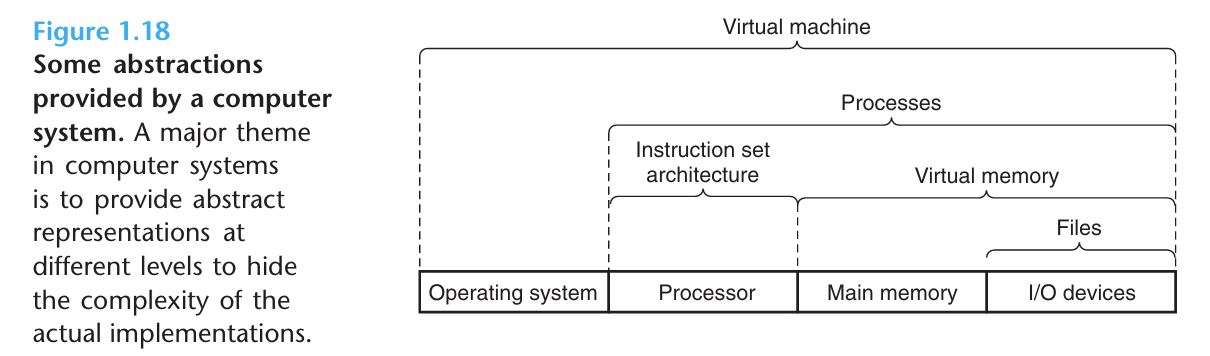
On the operating system side, we have introduced three abstractions: files as an abstraction of I/O devices, virtual memory as an abstraction of program memory, and processes as an abstraction of a running program.
To these abstractions we add a new one: the virtual machine, providing an abstraction of the entire computer, including the operating system, the processor, and the programs. The idea of a virtual machine was introduced by IBM in the 1960s, but it has become more prominent recently as a way to manage computers that must be able to run programs designed for multiple operating systems (such as Microsoft Windows,
Mac OS,and Linux) or different versions of the same operating system.
10 Summary
- 一个计算机系统由硬件和系统软件组成,它们协作来运行应用程序。
- 计算机内部的信息被表示为一组组bits,它们可以被不同的方式理解,取决于上下文(context)。
- 程序可以被其他程序翻译成不同形式,一开始是ASCII文本,被编译器和链接器翻译成二进制可执行文件
- 处理器读取并理解存储在主存中的二进制指令。
- 由于计算机花费大量时间在内存、I/O设备和CPU寄存器之间复制数据,系统中的存储设备被划分成层次结构,CPU寄存器在最顶层,然后是几层硬件高速缓存,然后是DRAM主存和磁盘存储器。在这个层次中,越高的存储设备就越快,单位bit的造价也越高。层次结构中较高层次的存储设备可以作为较低层次设备的高速缓存。
- 操作系统内核是硬件和应用程序的媒介,它提供三个基础的抽象:文件是I/O设备的抽象;虚拟内存是主存和磁盘的抽象(前面的图是I/O设备+主存,I/O设备可以看作对磁盘的一个泛指,毕竟I/O设备包含disk);进程是处理器、主存和I/O设备的抽象。
- 网络提供了计算机系统之间相互通信的方式,对一个特定的系统,网络就是一个I/O设备。