
1 - Intro and Java Basics
0 写在前面
课程上的是Spring 2021的版本,参考的资料之后也许会罗列出来,这学期已经学过数据结构基础了,但觉得没太学明白,所以再学一下61B
学习流程是:看视频(video)、书(视频和书都是24年的网站提供的)->写lab/hw/project
1 Intro
1.1 Hello World
1 | public class HelloWorld |
1.2 Static Typing
1 | public class HelloNumbers |
Java is a statically typed language(静态类型语言), which means that all variables, parameters, and methods must have a declared type. After declaration, the type can never change.
Expressions also have an implicit type; for example, the expression 3+5 has type int.
Because all types are declared statically, the compiler checks that types are compatible before the program even runs. This means that expressions with an incompatible type will fail to compile instead of crashing the program at runtime.
One of the key features of the Java compiler is that it performs a static type check.
注意这里的static type是指变量和表达式在编译期要有一个固定的类型,这个类型会在编译前检查,并不是指必须都带有static关键字。这意味着程序在运行时不可能会发生类型错误。
这和Python这样的dynamically typed language是不一样的。
1.3 Defining Functions
1 | public class LargerDemo |
1.4 Code Style
One special note is that all of your methods and almost all of your classes should be described in a comment using the so-called Javadoc format.
The widely used javadoc tool can be used to generate HTML descriptions of your code.
1.5 Java Workflow
Taking a program from a .java file into an executable has two main steps in Java:
compilation and interpretation.

To run the code in HelloWorld.java, we must first compile the code into a .class file, which we can do using the command javac HelloWorld.java. Then, to run the code, we would use the command java HelloWorld.
1 | javac HelloWorld.java |
There are several reasons for the usage of .class files, which we will only cover briefly here. First of all, .class files are guaranteed to have been type-checked, making the distributed code safer. They are also more efficient to execute, and protect the actual source code in cases of intellectual property(知识产权).
2 Defining and Using Classes
2.1 Static vs. Non-Static Methods
2.1.1 Static Methods
All code in Java must be part of a class (or something similar to a class, which we’ll learn about later).
1 | public class Dog |
试着运行,注意public类必须与文件名完全一致,一个.java文件里最多只能有一个public类,因此文件名必须为Dog.java
1 | javac Dog.java |
The Dog class we’ve defined doesn’t do anything. We’ve simply defined something that Dog can do, namely make noise. To actually run the class, we’d either need to add a main method to the Dog class, as we saw before. Or we could create a separate DogLauncher class that runs methods from the Dog class.
1 | public class DogLauncher |
编译运行
1 | javac DogLauncher.java |
A class that uses another class is sometimes called a “client” of that class, i.e. DogLauncher is a client of Dog. Neither of the two techniques is better: Adding a main method to Dog may be better in some situations, and creating a client class like DogLauncher may be better in others.
2.1.2 Instance Variables and Object Instantiation
狗有很多种类,不同的狗叫声也不一样
我们可以为不同的狗创建不同的类。一个类是可以被实例化的,实例化为一个对象,对象可以持有数据,因此我们也可以让Dog类里的methods根据不同狗的某个特征来做出不同的表现
1 | public class Dog |
下面我们使用Dog类
1 | public class DogLauncher |
-
An Object in Java is an instance of any class.
-
The
Dogclass has its own variables, also known as instance variables or non-static variables. These must be declared inside the class, unlike languages like Python or Matlab, where new variables can be added at runtime. -
The method that we created in the
Dogclass did not have the static keyword. We call such methods instance methods or non-static methods. If the method is going to be invoked by an instance of the class, then it shoule be non-static.
(Roughly speaking: If the method needs to use “my instance variables”, the method must be non-static.)
-
To call the
makeNoisemethod, we had to first instantiate aDogusing thenewkeyword, and then make a specificDogbark. In other words, we calledd.makeNoise()instead ofDog.makeNoise(). -
Once an object has been instantiated, it can be assigned to a declared variable of the appropriate type, e.g.
d = new Dog(); -
Variables and methods of a class are also called members of a class.
-
Members of a class are accessed using dot notation.
2.1.3 Constructors in Java
We usually construct objects in object oriented languages using a constructor:
1 | public class DogLauncher |
我们在创建对象时通过构造函数可以直接给instance variable赋值
1 | public class Dog |
The constructor with signature public Dog(int w) will be invoked anytime that we try to create a Dog using the new keyword and a single integer parameter.
2.1.4 Array Instantiation, Array of Objects
Java中的数组相关的语法
1 | int[] numbers = new int[3]; |
Java also supports iteration through an array using an “enhanced for loop”.
1 | public class BreakDemo |
The String s takes on the identity of each String in a exactly once, starting from a[0], all the way up to a[a.length - 1].
Similarly, we can create arrays of instantiated objects in Java.
1 | public class DogArrayDemo |
2.1.5 Summary
Java allows us to define two types of methods:
-
Class methods, a.k.a. static methods.
-
Instance methods, a.k.a. non-static methods.
Key differences between static and non-static(a.k.a. instance) methods:
- Static methods are invoked using the class name, e.g.
Dog.makeNoise(); - Instance methods are invoked using an instance name, e.g.
d.makeNoise(); - Static methods cna’t access “my” instance variables, because there is no “me”.
那么我们为什么需要静态方法呢?有时,一个类不会有实例对象,比如Math
还有一个原因,类里面可以既有静态方法也有非静态方法
假如对于Dog这个类,我们希望有一个比较的函数来比较两只狗,但不希望任何一只狗调用这个函数,而是让狗神来判断
1 | public class Dog |
当然,也可以用非静态方法
1 | /* we use the keyword this to refer to the current object. */ |
2.1.6 Exercise
给定一个Dog类型的对象数组,写一个函数,返回一个Dog类型的对象数组,其中的元素满足:
- 它的weight比原数组中左边的两个狗和右边的两个狗都大
- 如果左右的狗的数量之和小于4,就只算有的狗,比如原数组中第一个狗只需要比右边两只狗的weight大就满足条件
我们使用helper methods来使问题变得更清晰、降低程序的复杂度
1 | public class DogProblem { |
这个程序的框架就很清晰,接下来我们只需要去实现isBiggestOfFour等method
1 | /* Methods below are members of the DogProblem class. */ |
2.2 Static Variables
It is occasionally useful for classes to have static variables. These are properties inherent(固有的,内在的) to the class itself, rather than the instance.
1 | public class Dog { |
Static variables should be accessed using the name of the class rather than a specific instance, e.g. you should use Dog.binomen, not d.binomen.
2.3 Command Line Arguments
Since main is called by the Java interpreter itself rather than another Java class, it is the interpreter’s job to supply these arguments. They refer usually to the command line arguments.
1 | public class ArgsDemo { |
This program prints out the 0th command line argument.
1 | java ArgsDemo these are command line arguments |
In the example above, args will be an array of Strings, where the entries are {“these”, “are”, “command”, “line”, “arguments”}.
3 References, Recursion, and Lists
3.1 The Mystery of the Walrus
1 | Walrus a = new Walrus(1000, 8.3); |
猜猜结果是什么,打印出的结果是否相同?
weight: 5, tusk size: 8.30
weight: 5, tusk size: 8.30
这个的结果呢?
1 | int x = 5; |
3.1.1 Bits
All information in your computer is stored in memory as a sequence of ones and zeros.
Some examples:
-
72 is often stored as 01001000
-
205.75 is often stored as 01000011 01001101 11000000 00000000
-
The letter H is often stored as 01001000 (same as 72)
-
The true value is often stored as 00000001
One interesting observation is that both 72 and H are stored as 01001000. This raises the question: how does a piece of Java code know how to interpret 01001000 ?
The answer is through types ! For example, consider the code below:
1 | char c = 'H'; |
In this case, both the x and c variables contain the same bits (well, almost…), but the Java interpreter treats them differently when printed.
In Java, there are 8 primitive types: byte, short, int, long, float, double, boolean, and char.
3.1.2 Declaring a Variable (Simplified)
You can think of your computer as containing a vast number of memory bits for storing information. A specific group of bits has a unique address.
When you declare a variable of a certain type, Java finds a contiguous block with exactly enough bits to hold a thing of that type. For example, if you declare an int, you get a block of 32 bits. If you declare a byte, you get a block of 8 bits.
For the sake of having a convenient metaphor, we’ll call one of these blocks a “box” of bits.
For example, if you declared int x and double y, then Java might decide to use bits 352 through 384 of your computer’s memory to store x, and bits 20800 through 20864 to store y. The interpreter will then record that int x starts at bit 352 and y starts at bit 20800. For example, after executing the code:
1 | int x; |
We’d end up with boxes of size 32 and 64 respectively.
The Java language provides no way for you to know the location of the box, e.g. you can’t somehow find out that x is in position 352. In other words, the exact memory address is below the level of abstraction accessible to us in Java. This is unlike languages like C where you can ask the language for the exact address of a piece of data.
Java does not write anything into the reserved box when a variable is declared. In other words, there are no default values. As a result, the Java compiler prevents you from using a variable until after the box has been filled with bits using the = operator.
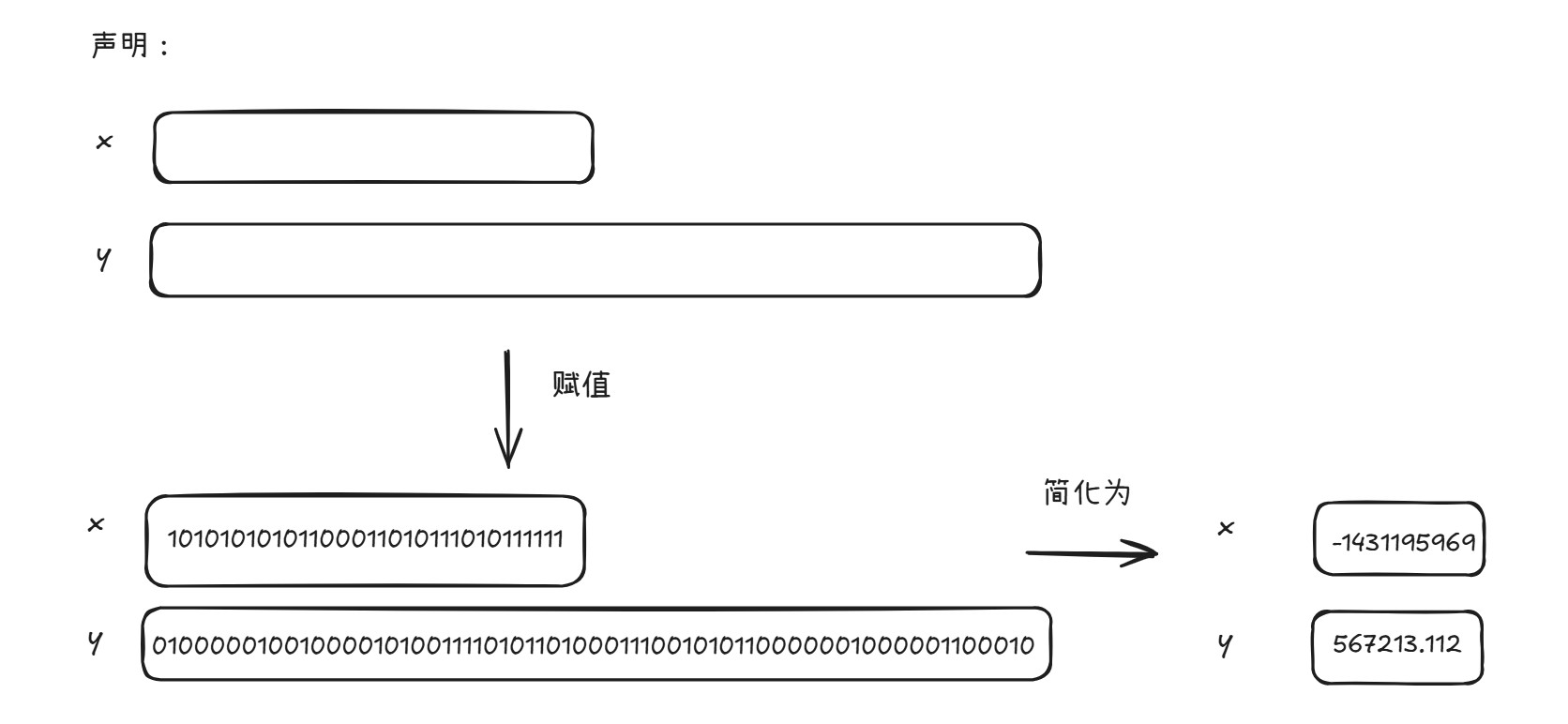
When you assign values to a memory box, it is filled with the bits you specify.
1 | x = -1431195969; |
此时x和y对应的“盒子”就会分别填入表示-1431195969的bits和567213.112的bits,如下图所示,这称为box notation
当然,这一串01我们不好理解,所以可以简化为bit串实际表示的值
3.1.3 The Golden Rule of Equals
It turns out our Mystery has a simple solution: When you write y = x, you are telling the Java interpreter to copy the bits from x into y. This Golden Rule of Equals (GRoE) is the root of all truth when it comes to understanding our Walrus Mystery.
3.1.4 Reference Types
Above, we said that there are 8 primitive types: byte, short, int, long, float, double, boolean, char. Everything else, including arrays, is not a primitive type but rather a reference type.
When we instantiate an Object using new (e.g. Dog, Walrus, Planet), Java first allocates a box for each instance variable of the class, and fills them with a default value. The constructor then usually (but not always) fills every box with some other value.
1 | public class PollQuestions { |
And we create a Walrus using new Walrus(1000, 8.3);, then we end up with a Walrus consisting of two boxes of 32 and 64 bits respectively(实际上这个对象占据的bit会多于96).
When we declare a variable of any reference type (Walrus, Dog, Planet, array, etc.), Java allocates a box of 64 bits, no matter what type of object.
The 64 bit box contains not the data about the walrus, but instead the address of the Walrus in memory.
1 | Walrus a; |
The first line creates a box of 64 bits. The second line creates a new Walrus, and the address is returned by the new operator. These bits are then copied into the a box according to the GRoE.
地址也是用bit串表示的,所以a也可以看作一个盒子,里面有一串0和1,表示的是Walrus对象的地址,比如这个新的Walrus对象的weight存在第x号bit,a的值就是x的二进制表示
null是一个特殊的地址值,都是0
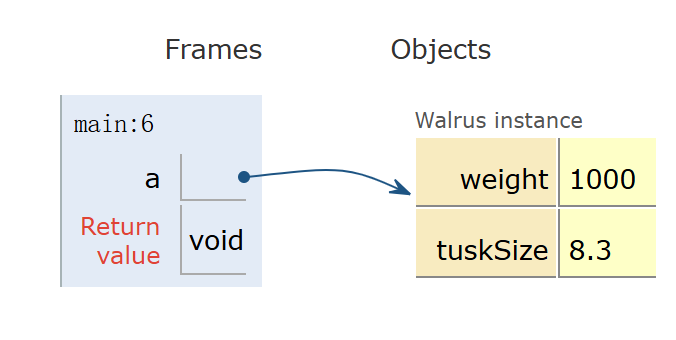
我们可以对引用类型的变量的盒子记号简化
- 如果地址是全0,就用null表示
- 如果地址不是全0,比起写一大串01,我们用一个箭头指向实例化的对象,表示这个引用类型变量存储的是这个对象的地址
这称为box and pointer notation
3.1.5 Resolving the Mystery of the Walrus
1 | Walrus a = new Walrus(1000, 8.3); |
首先声明一个Walrus变量a并赋值,接着声明一个Walrus变量b
b = a,别忘了就是把a“盒子”里的的bits复制到b这个“盒子”里,所以这时b和a存储的内容(地址)都是一样的了,它们都指向现在唯一存在的那个实例对象
b.weight = 5;就是先找到b指向的变量,并修改它的weight,因此a指向的变量的weight值会改变
而对于primitive type的int,就没有这个问题,只是x和y“盒子”里的数一直在变,它们之间并没有关系
3.2 Parameter Passing
When you pass parameters to a function, you are also simply copying the bits. In other words, the GRoE also applies to parameter passing. Copying the bits is usually called “pass by value”. In Java, we always pass by value.
1 | public static double average(double a, double b) { |
main函数前两行执行后,得到两个盒子,分别装有5.5和10.5
When the function is invoked, the average function has its own scope with two new boxes labeled as a and b, and the bits are simply copied in.
(也就是得到两个装有5.5和10.5的盒子,分别叫a和b)
If the average function were to change a, then x in main would be unchanged, since the GRoE tells us that we’d simply be filling in the box labeled a with new bits.
用Java Visualizer看一下
1 | public class PassByValueFigure { |
3.3 Instantiation of Arrays
As mentioned above, variables that store arrays are reference variables just like any other.
1 | int[] x; |
Both of these declarations create memory boxes of 64 bits. x can only hold the address of an int array, planet can only hold the address of a Planet array.
1 | x = new int[]{0, 1, 2, 3}; |
When instantiating an array, the new keyword creates 4 boxes of 32 bits each and returns the address of the overall object for assignment to x.
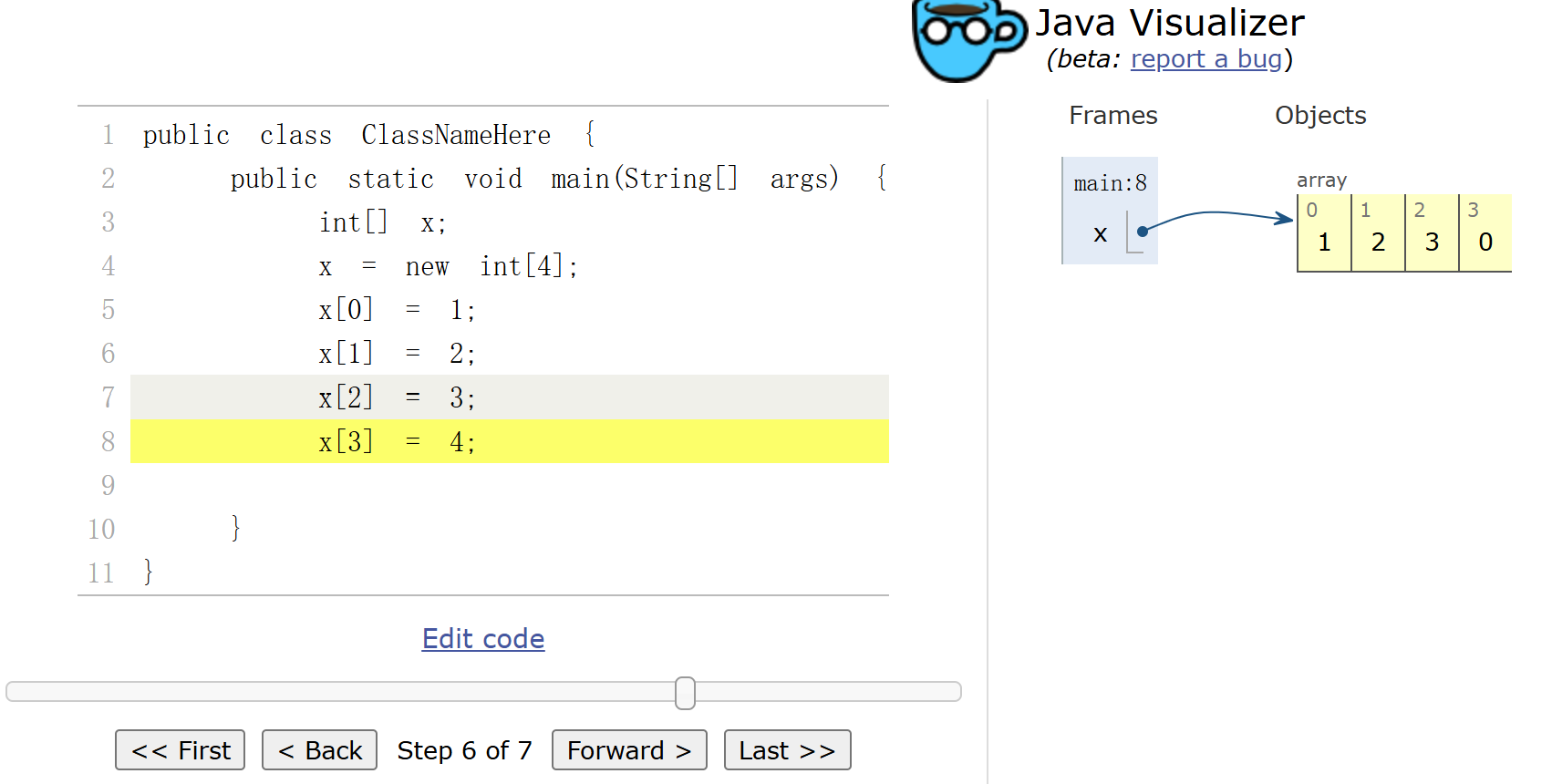
Objects can be lost if you lose the bits corresponding to the address. For example if the only copy of the address of a particular Walrus is stored in x, then x = null will cause you to permanently lose this Walrus. This isn’t necessarily a bad thing, since you’ll often decide you’re done with an object, and thus it’s safe to simply throw away the reference.
3.4 == vs. Arrays.equals
Similar to =, we can think of the == operator in terms of bits. Whenever we write x==y we are asking Jafa to compare the literal bits in memory boxes x and y.
1 | int[] x = new int[]{0, 1, 2, 95, 4}; |
This code will print false, since x and y each contain the 64 bit address of two different arrays in memory, albeit two arrays which happen to contain the same information. If we want to compare the two content of the two arrays, we can use Arrays.equals instead.
4 Testing
4.1 Truth Testing
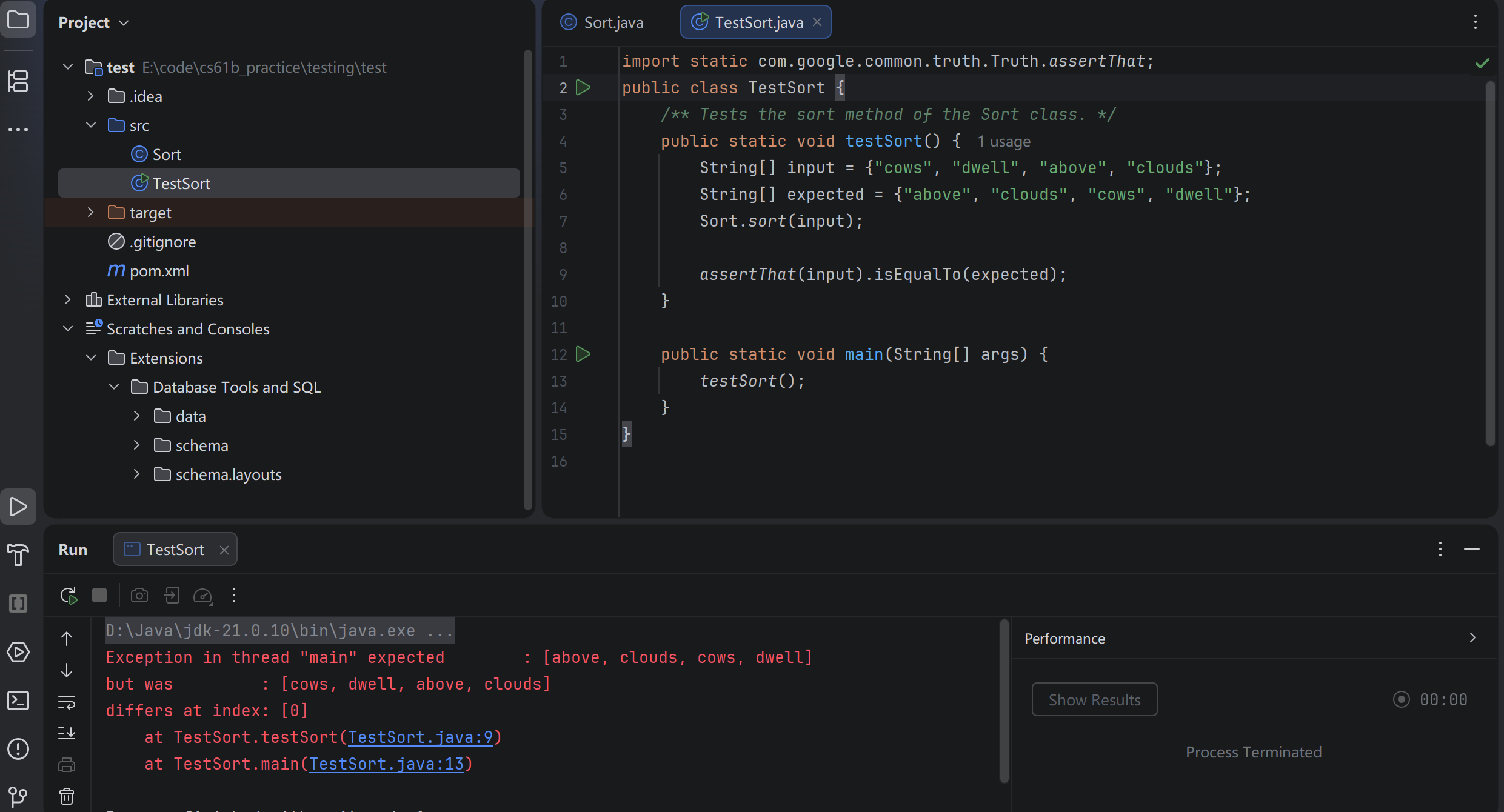
The Google Truth library provides a number of helpful methods and useful capabilities for simplifying the writing of tests.
1 | import static com.google.common.truth.Truth.assertThat; |
4.2 Selection Sort
选择排序,每次选最小/大的,和未排序元素的第一个交换
1 | public class Sort { |
4.3 findSmallest
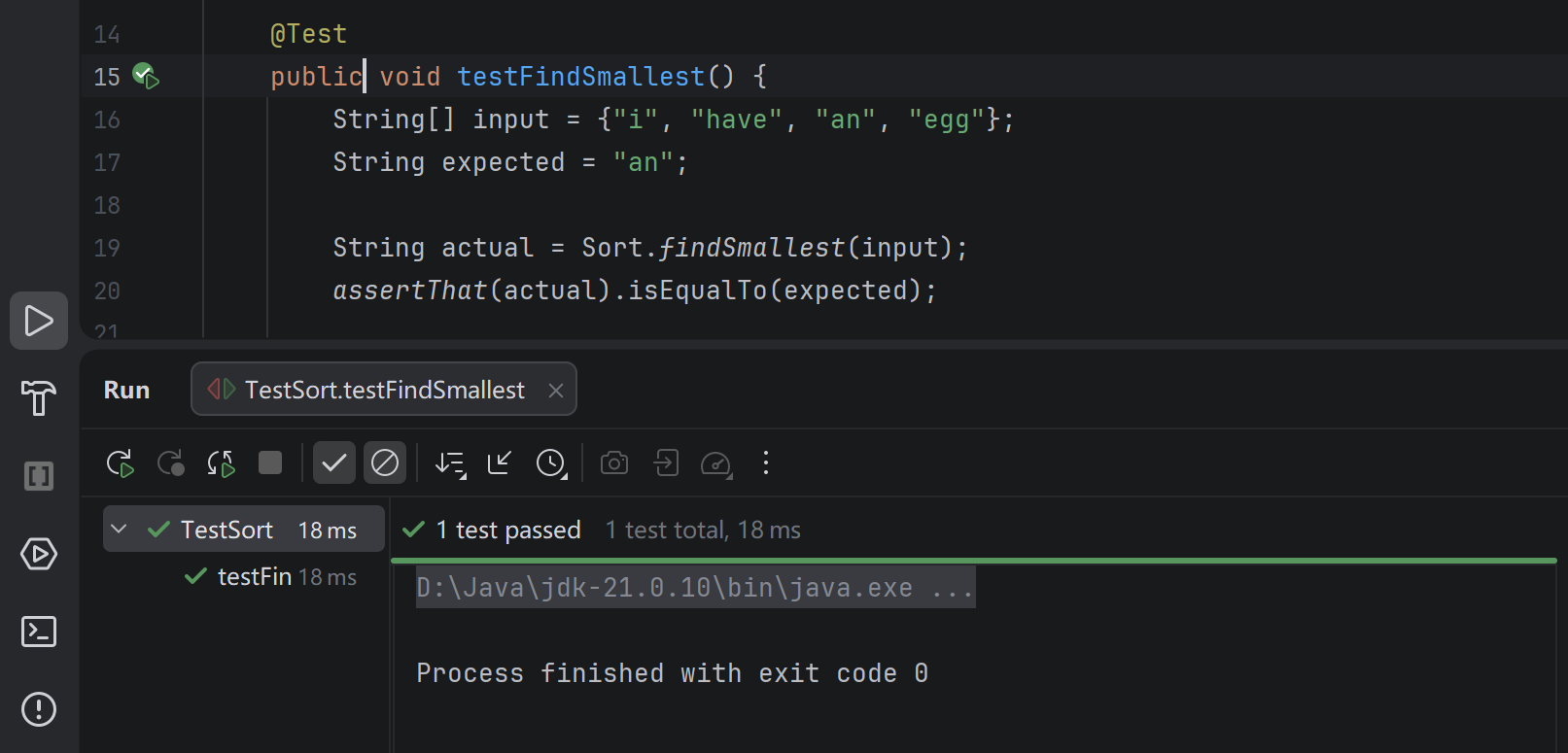
As with Sort.sort, we’ll start by writing a test before we even complete the method.
我们先写测试,记得加上import org.junit.Test;
1 | public class TestSort { |
运行测试,会得到
1 | value of: findSmallest(...) |
下面我们完善findSmallest
1 | /** Returns the smallest string in x. */ |
4.4 Swap
先写出测试
1 | /** Test the swap method of the Sort class. */ |
然后写函数
1 | public static void swap(String[] x, int a, int b) { |
从这里可见,换元素需要的是下标,所以findSmallest要改一下,改成返回最小元素的下标,同时也要更新testFindSmallest
4.5 Recursive Helper Methods
现在我们可以开始写sort了
1 | /** Sorts strings destructively. */ |
这该怎么递归呢,这里可以先看一下下一篇文章再来阅读,编排的时候有些问题,看完后就知道,我们也许可以借鉴用一个private的辅助method去做
1 | /** Sorts strings destructively starting from item start. */ |
This approach is quite common when trying to use recursion on a data structure that is not inherently recursive.
但是,我们的sort还是错的,可以在testSort里设置断点,对这个test进行debug,debug时可以打开Java Visualizer插件,step into是进入调用的方法内部,一步一步执行,step over是跳过方法内部过程,直接执行完,step out是跳出当前方法,回到结束调用的位置
通过debug即可发现,每次找到的最小元素都是数组里最小的,而不是那些未排序元素里最小的,所以要修改findSmallest
1 | public static int findSmallest(String[] x, int start) { |
4.6 Reflections on the Development Process
When you’re writing and debugging a program, you’ll often find yourself switching between different contexts. Trying to hold too much in your brain at once is a recipe for disaster at worst, and slow progress at best.
Having a set of automated tests helps reduce this cognitive load. For example, we were in the middle of writing sort when we realized there was a bug in findSmallest. We were able to switch contexts to consider findSmallest and establish that it was correct using our testFindSmallest method, and then switch back to sort. This is in sharp contrast to a more naive approach where you would simply be calling sort over and over and trying to figure out if the behavior of the overall algorithm suggests that the findSmallest method is correct.
注意,如果我们在一个方法前加上@Test且这个方法不再是static的,就会出现绿色箭头,单绿色箭头意味着运行这个测试,双绿色箭头意味着运行这个类里的所有测试
4.7 Testing Philosophy
Test-Driven Development (TDD)
TDD is a development process in which we write tests for code before writing the code itself. The steps are as follows:
-
Identify a new feature.
-
Write a unit test for that feature.
-
Run the test. It should fail.
-
Write code that passes the test. Yay!
-
Optional: refactor code to make it faster, cleaner, etc. Except now we have a reference to tests that should pass.
Test-Driven Development is not required in this class and may not be your style but unit testing in general is most definitely a good idea.